BV 10-40 Subtitles always shown

5 replies
Hi All A minor prob after reloading Freesat and terrestrial TNT here in France. On satellite after changing channel subtitles are always shown, they can be stopped on the menu system, not the BnO one the French TNT one , so it's a minor inconvenience, my connected problem is that the selected no subtitles setting is not saved! Anyone out there any ideas? Is it connected to the Freesat channel reload? I have just mailed BnO Tech Support as well! Have a good rest of sunday Tony
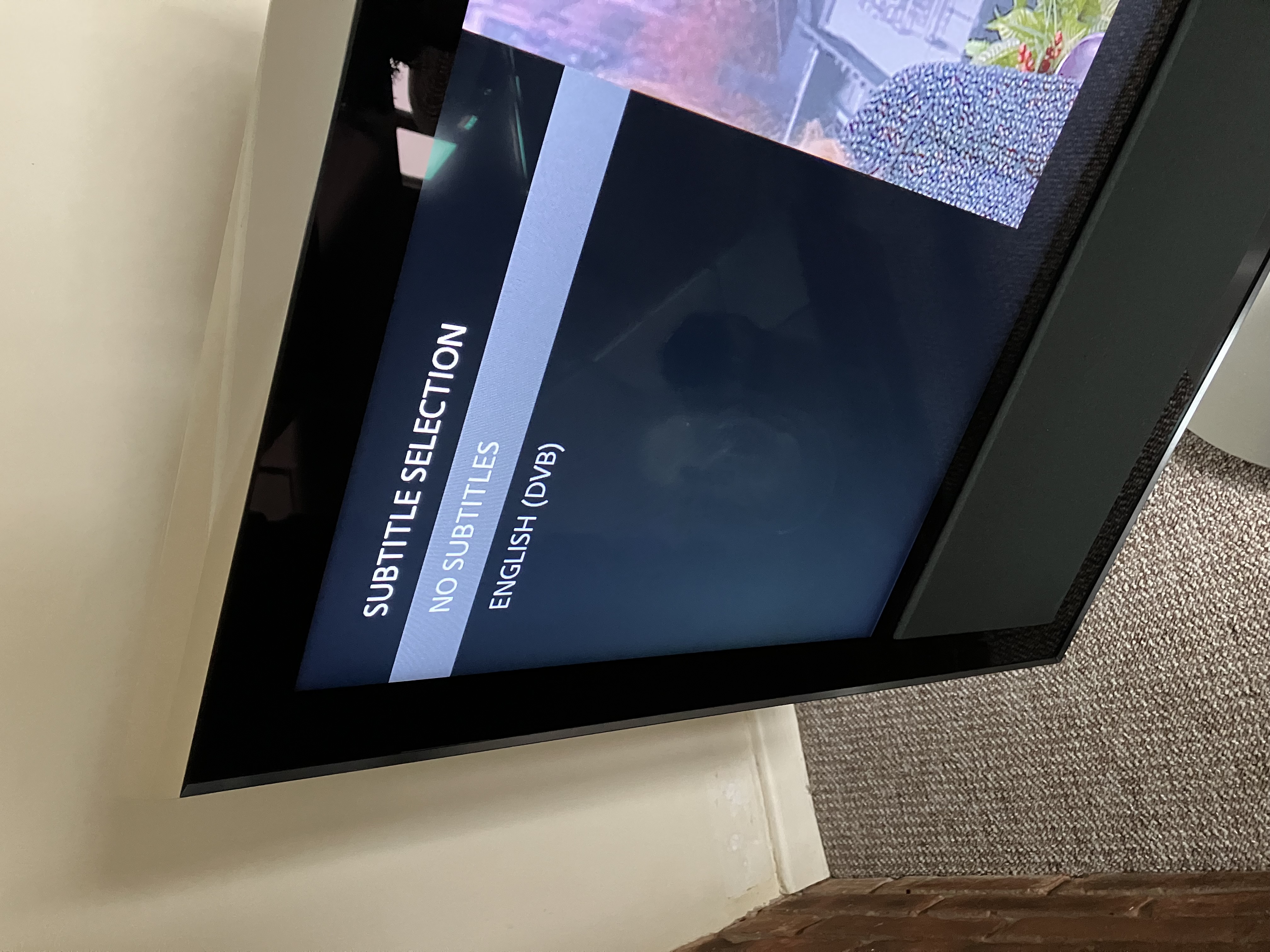
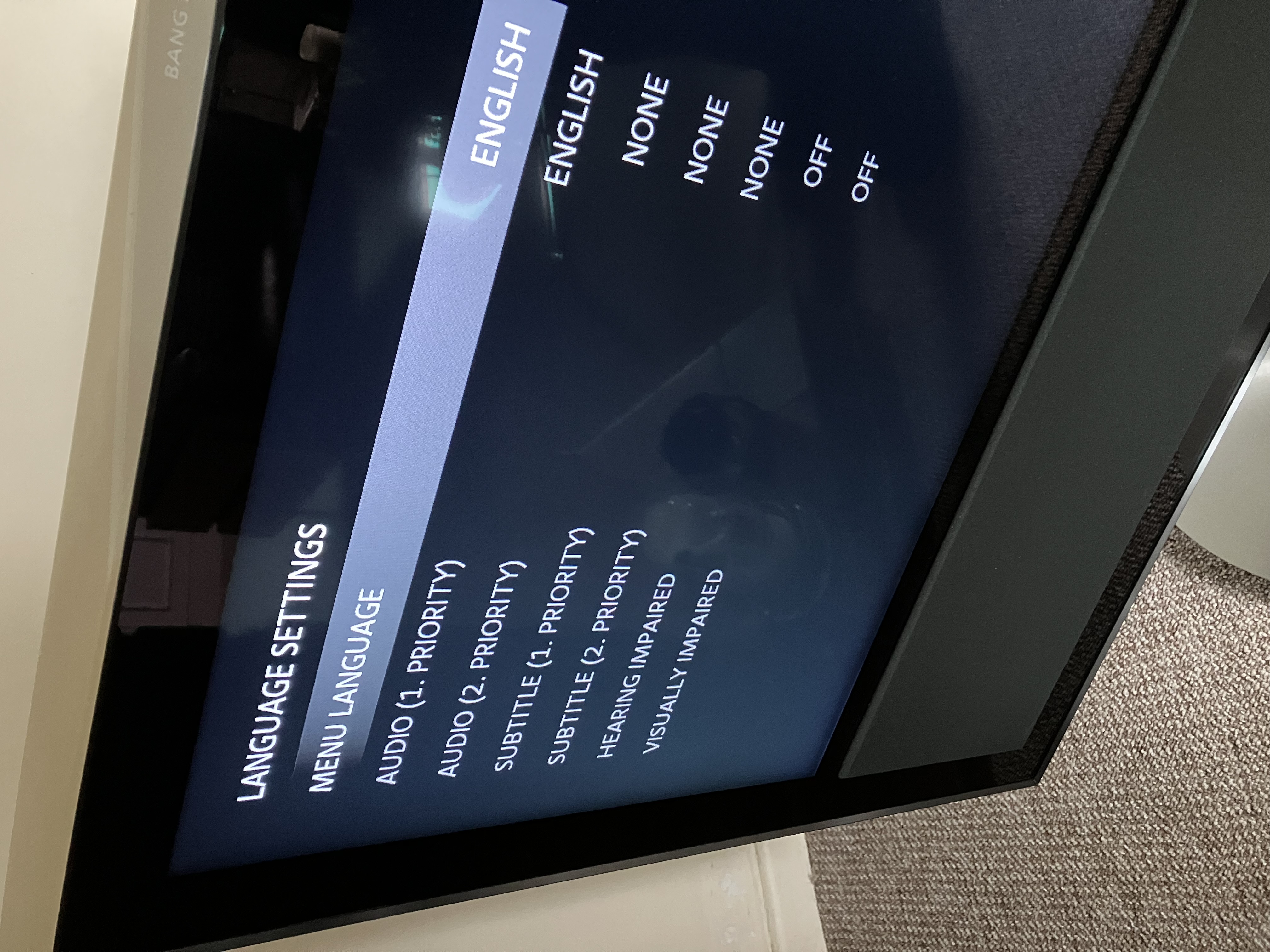
To turn off subtitles on my BV10-32, you have to go to both: SUBTITLES LANGUAGE - and select 'NO SUBTITLES' SETUP, then OPTIONS, then LANGUAGE - and select 'NONE' for the two listed subtitles language options. EDIT:  Photos of the two pages:

Location: Warwickshire, UK

My B&O Icons:

Https://Beoworld.Org/Wp Content/Uploads/2025/01/Beocenter 9500 Https://Beoworld.Org/Wp Content/Uploads/2025/01/Beocenter 9500
Https://Beoworld.Org/Wp Content/Uploads/2025/01/Beoremote Beo4 Https://Beoworld.Org/Wp Content/Uploads/2025/01/Beoremote Beo4
Https://Beoworld.Org/Wp Content/Uploads/2025/01/Beovision 10 1 Https://Beoworld.Org/Wp Content/Uploads/2025/01/Beovision 10 1
Https://Beoworld.Org/Wp Content/Uploads/2025/01/Beotime 1 Https://Beoworld.Org/Wp Content/Uploads/2025/01/Beotime 1
Https://Beoworld.Org/Wp Content/Uploads/2025/01/Beosound 1 Https://Beoworld.Org/Wp Content/Uploads/2025/01/Beosound 1
Https://Beoworld.Org/Wp Content/Uploads/2025/01/Beosound Explore 1 Https://Beoworld.Org/Wp Content/Uploads/2025/01/Beosound Explore 1
Https://Beoworld.Org/Wp Content/Uploads/2025/01/Beosound Essence 2 Https://Beoworld.Org/Wp Content/Uploads/2025/01/Beosound Essence 2
Https://Beoworld.Org/Wp Content/Uploads/2025/01/Beoplay P2 1 Https://Beoworld.Org/Wp Content/Uploads/2025/01/Beoplay P2 1
Https://Beoworld.Org/Wp Content/Uploads/2025/01/Beoplay M3 1 Https://Beoworld.Org/Wp Content/Uploads/2025/01/Beoplay M3 1
Https://Beoworld.Org/Wp Content/Uploads/2025/01/Beoplay H4 1 Https://Beoworld.Org/Wp Content/Uploads/2025/01/Beoplay H4 1
Https://Beoworld.Org/Wp Content/Uploads/2025/01/Beoplay H3 1 Https://Beoworld.Org/Wp Content/Uploads/2025/01/Beoplay H3 1
Https://Beoworld.Org/Wp Content/Uploads/2025/01/Beoplay Form 2I 1 Https://Beoworld.Org/Wp Content/Uploads/2025/01/Beoplay Form 2I 1
Https://Beoworld.Org/Wp Content/Uploads/2025/01/Beoplay Earset 2 Https://Beoworld.Org/Wp Content/Uploads/2025/01/Beoplay Earset 2
Https://Beoworld.Org/Wp Content/Uploads/2025/01/Beoplay A2 1 Https://Beoworld.Org/Wp Content/Uploads/2025/01/Beoplay A2 1
Thanks Guy, Yes I had tried that but it wouldn't 'stick' so to speak, just tried again and held the select button down until it reset so my fault I wasn't pressing the button long enough! Again, a big thanks?
Hi Tony, I had the same problem. When I put up a new dish and ran new coax the problem disappeared.  It was damaged coax. Eddie

My B&O Icons:

Https://Beoworld.Org/Wp Content/Uploads/2025/01/Beocenter 9500 Https://Beoworld.Org/Wp Content/Uploads/2025/01/Beocenter 9500
Https://Beoworld.Org/Wp Content/Uploads/2025/01/Beoremote Beo4 Https://Beoworld.Org/Wp Content/Uploads/2025/01/Beoremote Beo4
Https://Beoworld.Org/Wp Content/Uploads/2025/01/Beovision 10 1 Https://Beoworld.Org/Wp Content/Uploads/2025/01/Beovision 10 1
Https://Beoworld.Org/Wp Content/Uploads/2025/01/Beotime 1 Https://Beoworld.Org/Wp Content/Uploads/2025/01/Beotime 1
Https://Beoworld.Org/Wp Content/Uploads/2025/01/Beosound 9000 1 Https://Beoworld.Org/Wp Content/Uploads/2025/01/Beosound 9000 1
Https://Beoworld.Org/Wp Content/Uploads/2025/01/Beomaster 1 Https://Beoworld.Org/Wp Content/Uploads/2025/01/Beomaster 1
Https://Beoworld.Org/Wp Content/Uploads/2025/01/Beogram 400X 1 Https://Beoworld.Org/Wp Content/Uploads/2025/01/Beogram 400X 1
Https://Beoworld.Org/Wp Content/Uploads/2025/01/Beocenter 2 1 Https://Beoworld.Org/Wp Content/Uploads/2025/01/Beocenter 2 1
Thanks for the suggestion, don't think its a failed cable as it is loose across the attic to an amp and then a diplexer to the tv, the other service, radio, did not show any signs of probs! T
Post a Reply
Attach Files
Max 10MB per file. Images, videos, PDFs, documents, archives, and 3D models accepted.
Please Log In to Reply

You must be logged in as a BeoWorld member to post replies to forum threads.

Rejoining the server...

Rejoin failed... trying again in seconds.

Failed to rejoin.
Please retry or reload the page.

The session has been paused by the server.

Failed to resume the session.
Please retry or reload the page.